As a freelance writer, I was hit hard by the recent Paypal outage which prevented me from withdrawing funds from Paypal into my Bank account. Out of desperation, I decided to try Moneybookers [That’s an affiliate link btw :) ] as an alternative to using Paypal for withdrawing money to my Indian bank account. And while I still get payments into my Paypal account, oDesk has an option to withdraw my funds into a Moneybookers account.
I was a bit hesitant going into Moneybookers because I had heard a lot about how they supposedly freeze accounts and charge high fees. But as I said, I was desperate and I’m glad I decided to open a Moneybookers account – it’s cheaper than Paypal with better currency conversion fees and it delivers cash into my account just as fast. The only hurdle to using Moneybookers fully is their highly strict verification process. I had to verify my Email ID, my card, my Bank account, my address (twice) and finally my ID. After all the verifications however, my account is fully operational with very high limits.

Moneybookers is based in Europe, and their strict verification rules stem from implementing the UK’s anti money laundering procedures. People who have their accounts frozen have likely not completed all the procedures required by Moneybookers.
For those in India thinking of using Moneybookers as an option for withdrawal of funds into Indian bank accounts, here is a detailed account of how I set up my account and got verified step by step.
Opening an Account
Opening a Moneybookers account is simple. Head over to the Moneybookers home page and click the “Register” button. Be very careful while filling out the registration form, cause I gotta warn you – they’re going to check everything! Also, ensure that you choose your account’s currency carefully. You can never change it after this. And finally, be warned that you can have only one Moneybookers account. If you try and create two (they’ll likely find out if you do), your accounts will be frozen and there’s no use crying afterwards. They take their security procedures very seriously.
I receive all my payments in USD and I chose to have my Moneybookers currency set as USD, since this allows me to escape two currency conversion fees. If you instead choose a currency such as Euros and you receive a payment in USD, you’ll be hit with currency conversion fees twice – first from USD into EUR and then EUR into INR when you withdraw to an Indian bank account. So choose carefully!
Email ID and Physical Address Verification
Once you’ve opened your account, you’d better start the verification procedures ASAP. Your account is never fully functional until you do and even if you don’t hit your withdrawal limits, Moneybooker’s security team is likely to force you to verify your account if you don’t do it soon. The Email ID verification is simplicity itself. They send an email to the address you provide and you click the included link to verify it.
There are two physical address verifications. The first verification is designed to check whether the person who has opened the Moneybookers account really lives at the address provided. Mind, this isn’t a name verification yet. Just a check to see if you’ve given a valid address. When you try and verify your Indian address, Moneybookers will send you a physical letter containing a 6 digit number which you have to key into the Moneybookers verification page. If you enter it correctly, your address is verified and your money sending and withdrawal limits are increased.
I live in Chennai and I got the letter from Moneybookers in 5 days or so. Pretty neat!
Credit/Debit Card Verification
The second step is to verify your card. It’s important to note that you can verify your card only if the name on the card is the same as the one you signed up with on Moneybookers. For verification, they charge your card a small amount and you have to then enter the exact value taken from your card. This proved to be a bit difficult for me for two reasons. First, I don’t have a credit card and when I tried using my ICICI debit card, the verification failed. Apparently Moneybookers didn’t like it.
I bank with ICICI and some time ago, I signed up for a b2 branch banking account – a completely online bank facility which has an “eWallet”. I tried using these details for card verification and it worked! But then a problem occurred. Moneybookers wanted me to enter the amount debited in USD and since my ICICI account was in INR, I only saw the INR value! I tried guessing the value based on the conversion rate and was confronted with a stern message in red saying “Please DO NOT TRY and guess the amount” after which they disabled the verification for 24 hrs – Ouch.
So I contacted the b2 bank using their online chat facility (damn neat that is) and asked them to give me the exact USD value debited. After a bit of checking, they confirmed that it was exactly $1.51 . I waited for 24 hrs, input the amount into the Moneybookers verification screen and voila! It was correct, I was verified and my account limits were increased further.
Adding and verifying a Bank account
This was the most difficult part of the verification procedure for me. There are two ways to verify your Indian bank account with Monebookers. First, you can upload some funds to the Moneybookers account via a wire transfer. The other is by withdrawing some funds to your bank account from Moneybookers first and then entering the verification code that they send along with your first withdrawal. Neither of them worked for me though…
The first step is adding your bank. You need to know the SWIFT code of your bank for Moneybookers to wire the funds to you. On the receiving end, my ICICI bank charges me Rs. 25 for each incoming wire transfer – quite reasonable. Sadly, though all banks have a SWIFT code, not all branches do. After trying in vain to find out the SWIFT code of my ICICI bank branch, I decided to call ICICI and find out what it is. The customer rep asked me if the sender was sending funds in USD or INR. I naturally assumed that the funds were being sent in USD (since my funds are stored in USD) and I obtained the USD specific SWIFT code for ICICI.
However, when I put in the SWIFT code, Moneybookers didn’t recognize it as an Indian bank. So after a lot of searching around, I finally got the correct SWIFT code for ICICI which is ICICINBBNRI . What seems to be happening is that Moneybookers is first converting my USD to INR and then sending it to the bank I specify. So naturally it counts as an INR transfer and not a USD. At least, that is what I think is happening. At any rate, my funds sailed through to my bank account in just two days. To be on the safe side, I had withdrawn only the small amount of $14 the first time. I was pleasantly surprised to find a conversion rate much better than Paypal’s.
Moneybookers Bank Verification
Eagerly I searched for the verification code that was promised along with the wire transfer details, but didn’t find any such code. I was informed by Moneybookers that it would be a 6 digit alphanumeric code preceded by “VRF CODE”. But after many calls to the ICICI NRI department, no such code was found.
Disappointed, I decided to opt for the other method of verification namely uploading funds from my bank account to Moneybookers. Armed with all the details I walked over to ICICI to make the transfer, when I was informed that each transfer would cost me more than $30! I couldn’t afford that, and so I came home disappointed.
I contacted Moneybookers customer support over the phone (using Skype) and told them that it was too expensive for me to upload funds to Moneybookers and that I hadn’t received any VRF CODE in my first withdrawal either. They kindly offered to verify my bank account manually and asked me to send over either a screenshot of my online bank account or a scanned copy of my bank statement. The details they wanted shown on the document were:
- Bank account number
- Name of the person (my name)
- Transaction details showing the withdrawal into ICICI from Moneybookers
- Date of the Transaction
- Moneybookers as the sender of the funds
I took a screenshot of my online statement and circled the relevant details in black. Here is what I sent over:
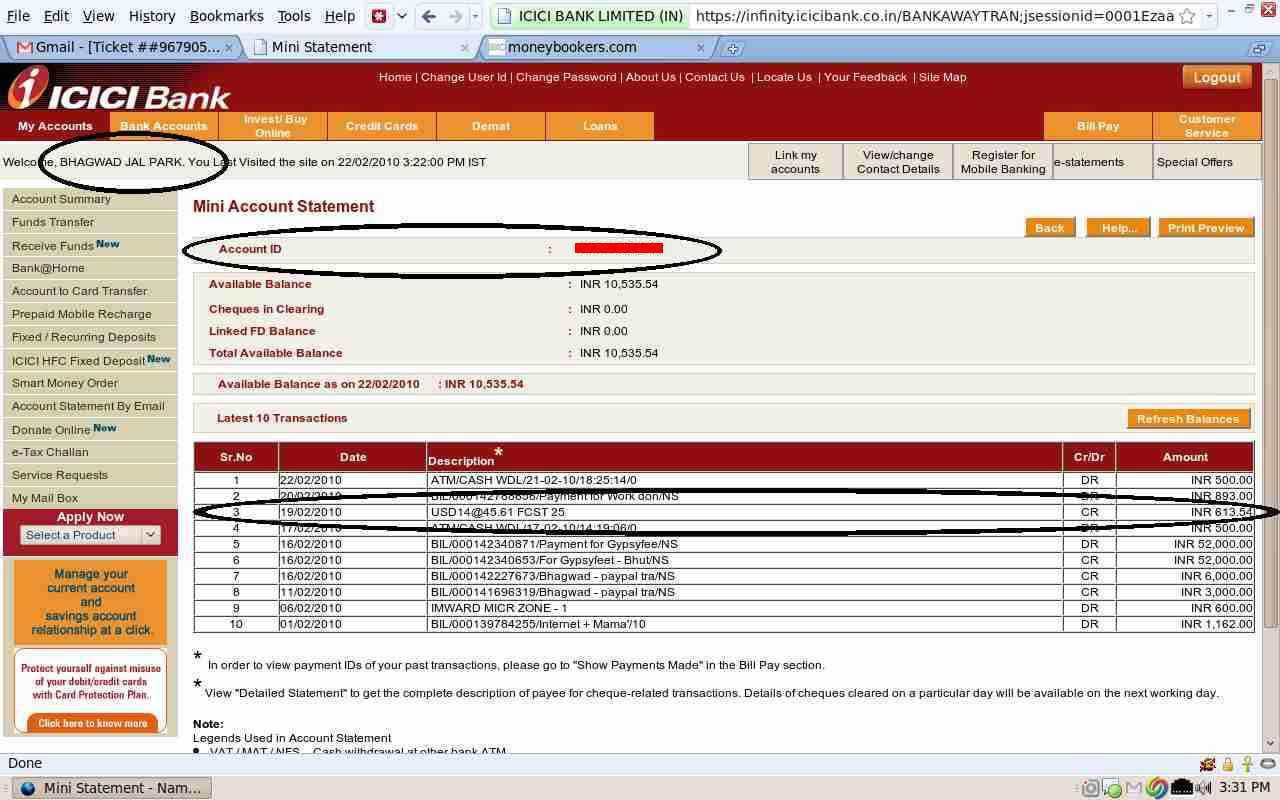
Unfortunately for me, all the needed details are visible except No. 5 – the name of the sender (Moneybookers). Their security team rejected the screenshot saying so, and asked me to send them the physical statement of the bank. I called ICICI and asked them if the physical bank statement would show Moneybookers as the sender, and they told me that they couldn’t see the details of the sender themselves!
I was stymied and once again called up Moneybookers and pleaded with them saying that my bank couldn’t provide me with a statement showing them as the sender. They got back to me saying that if that was the case,I must at least get a full print out of the SWIFT transaction from my bank, scan it and send it to them. So off I went to ICICI the next day to do just that and obtained this document:
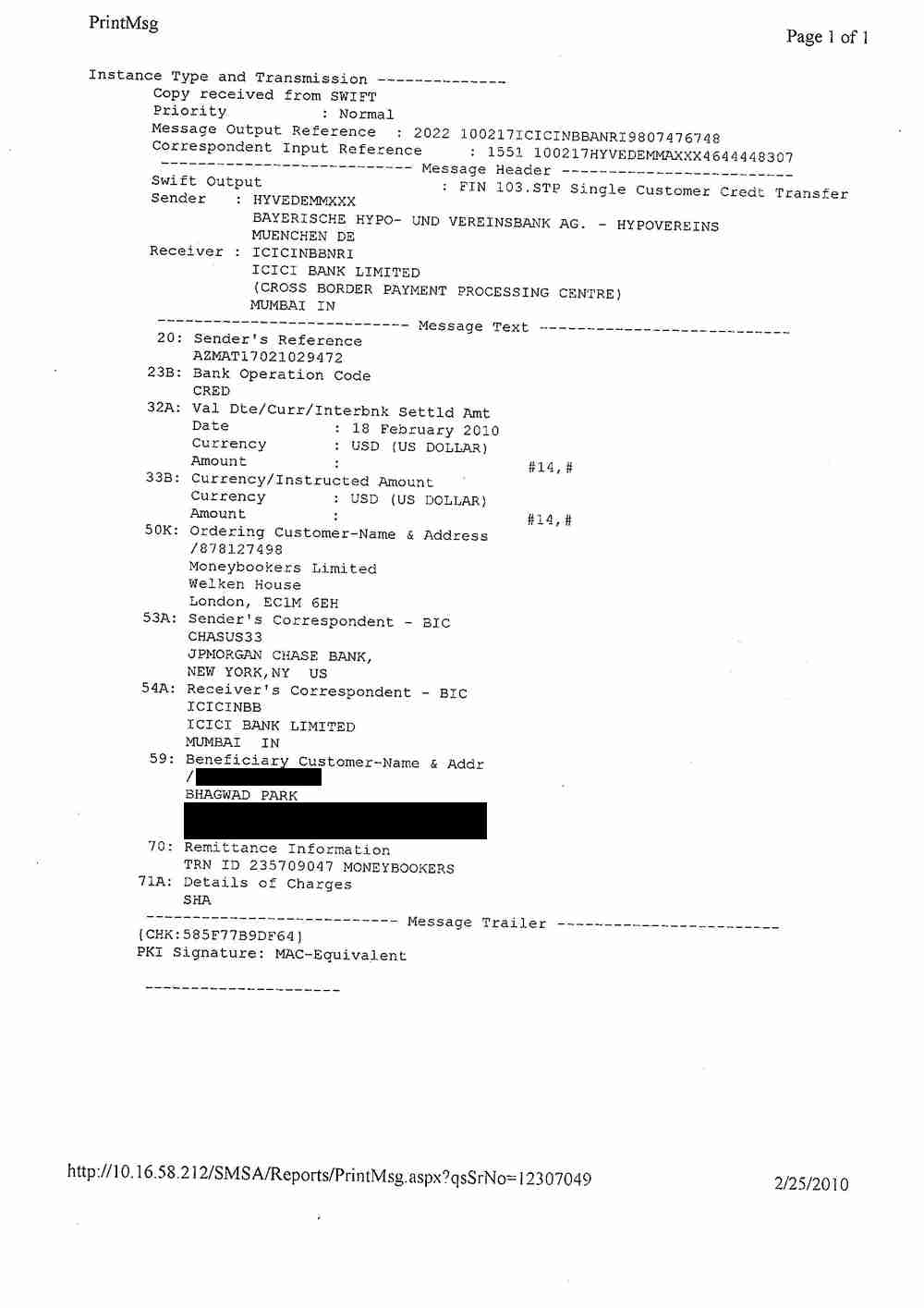
Praying to the (non existent) gods that they accept this as proof that I am indeed the owner of the Bank account in question, I sent it off to them and was rewarded two days later with an email from the security departing saying that my bank account has (at last!) been verified by their department. And my withdrawal limits were raised once more.
After my bank account verification, there was just one more thing for them to check up…
Commercial account vs Personal Account
I was reading some forums a week ago, when I came across the disturbing news that if I was using Moneybookers to receive payments for goods or services (which as a writer, I am), then I must have a commercial account and not a personal one. When you sign up for a Moneybookers account, you’re asked if you’re an individual or a company. Since I’m an individual, I got a personal account instead of a commercial one.
I went back and read the Moneybookers TOS and saw that if they suspect that I’m using a personal account to receive commercial payments, their security team will freeze the account and ban me. I was scared, and once again placed a call to them telling them that I’m a freelancer and that though I use my account for commercial purposes, I’m not a company but an individual. They got back to me with a mail saying that if that was the case, they would treat my account as a commercial one and that they wanted two further documents from me to prove my identity, namely:
- A scanned copy of a government issued document with an expiry date
- A utility bill that has actually arrived by post in the past 3 months
I was only too happy to send them a copy of the front and back of my passport, but I had a problem with the second requirement. Internet techie that I am, I pay every single bill of mine online and when I sent them my reliance Internet bill which arrived by email, the security team told me that it must be a scanned copy of a bill that was actually received by post in the last 3 months. Since I’ve just got back from outside India, I don”t have any such bill and had to wait for a while to obtain it.
They also sent over a “Merchant questionnaire” word document requesting details about my business and what I do etc etc. They told me to leave out the fields which are not applicable, and there were many like this since I’m not a company.
As matters stand, I’m still waiting for my Internet bill to arrive by post so that I can finish up this final verification stage. I finally got my Internet bill by post, scanned it (and scanned the envelope before opening it for good measure!), filled out the questionnaire with all details that were applicable to me and uploaded all three documents to the Moneybookers security team. I got back a reply in less than an hour thanking me for sending across the documents and informing me that all was well.
So that was the end of the verification procedures for me. I’m completely verified and all set to go! I’ve already withdrawn several thousand rupees into my ICICI bank account from Moneybookers and it’s been a better experience than Paypal due to the higher conversion rates.
I only wish there was some way to transfer money from my Paypal account to Moneybookers, since Paypal withdrawals into Indian bank accounts are more expensive and are fraught with complications thanks to the recent RBI ban. Moneybookers seems to be a professional company, and though their verification procedures can get a bit on one’s nerves, it’s that very scrutiny that inspires trust.
So here’s hoping that more Indian providers will ask their clients if they use Moneybookers for payments and if so, open an account with them.
I set up moneybookers account and they closed it after sending initial money for “security reasons” and then asked for identity documents (passport + utility bill). I am NOT comfortable sending this information over the internet to ANYONE as you have no guarantees these documents to be safe. It is easy to commit identity theft using these and to make moneybookers take responsibility is for sure almost impossible (who to contact and where). If this would happen in your bank atleast you can go to the counter and talk to someone in person.
No matter what the regulations are I am not going to give them information (they might even sell it, who knows) and I rather lose the initial amount.
They should ask this WHEN OPENING the account, NOT AFTER, like they do in normal bank (as they claim to be…)
In reply to HL
You only have to scan and send them a digital copy of your documents. Not the originals…
Yes I do agree too, that they should ask or rather list the documents required for operating the account. I may be wrong in my assumption but my guess is that they don’t do all this document verification for European /American natives its mostly done for users from 3rd world country.
Identity theft is real issue on the internet but still you cant operate bank accounts based on someones identity if you get access to the documents as they ask part of the info when you register & rest of the docs afterward.
Ranjan and HL. You are both wrong in your assumptions. I am English and everything you do to verify your account in India i had to do the the same in the UK. HL this one is for you. This is a multinational company taking billions of dollars a year through it. You are thinking with reverse psychology. I would be extremely worried if a company DID NOT ask you for these documents. Of course you must reveal this information when opening an account of this nature, that part should be self explanatory you don’t need a school backboard to know this. They are protecting your interest making you go through such a vigorous verification process. If it worries you send it to them through the post, it will be safe once it gets out of India.
Thanks Lee
for confirming that even UK based users are also needing this verification.
I surely can help but wonder if he is able to understand Hindi or not, which part of India does he belong to & what is his native language?
Hi Rajan yes thank you. His language is Hindi and he is from Moradabad. His name is Abdullah. I have only recently realized the complex language difference in India. As you can imagine my country is very small in comparison, so we all speak the same. His number is +91 9456223434 although this is the number i ring internationally so i am not 100% sure of the internal method. Please ask for my details from him! but not my passport and utility bill haahahaha. warm regards Lee.
Recently Paypal started electronic transfer to Indian customers. I just wanted to check Whether Moneybookers or Paypal gives the best conversion rates to Indian customers.
On August 5, 2010 I withdrew 174 USD from Odesk to Paypal. USD 169.91 were credited to my Paypal account. On that day USD rate was 1 USD = INR 46.175 and Paypal’s 1 US Dollar = 44.6842. Eventually USD 164.76 (after deducting their service charges) Paypal converted to INR totalling to Rs.7,458.23. On 12th August 2010 the exact amount of Rs.7,458.23 was credited to my bank account thru NEFT.
Now to check Moneybookers rate, On August 11, 2010 I withdrew 174 USD from Odesk to MB on that day USD rate was 1 USD = INR 46.675 (and Paypal’s rate was 1 US Dollar = 44.72) after deducting their service charges Rs. 7616.30 were available for transfer from MB to my Indian bank account. On 16th August 2010 Rs. 7178.42 were credited to my HDFC bank account with Rs. 90.66 deducted as incoming SWIFT charges.
I have my observations here :-
PAYPAL
1. The total amount available for transfer what you see in your Paypal account after conversion+paypal fees is the actual amount you receive in your bank account and there is no NEFT incoming charges. Like in my case Rs. 7,458.23 were transferred and I received the same amount.
MB
2. The total amount available for transfter what you see in your MB account after conversion + MB fees falls short when you receive in your bank account and you have to pay incoming SWIFT charges (though it differs from Bank to Bank). Like in my case I received Rs. 7178.42 (where as Rs. 7616.30 were availabe for transfer) with deduction of Rs. 90.66 as incoming SWIFT charges.
After going thru the above experience, I am of the opinion for Indian freelancers that it is better to use Paypal service.
In reply to Taiseer
Wow – HDFC is really high! You tried to transfer 7,616 and got only 7,178? That’s way more than I get charged with ICICI. So perhaps the final answer is it depends on which bank you have.
Also, was your Moneybookers account in USD or INR? If it was in INR, it’ll cost more. If it’s in USD (like mine is) it’s much cheaper since there are fewer conversion charges.
OK thanks, when you say transferred, i assume the India pay pal account can withdraw to their bank? And the money goes via electronic transfer not E check. Basically i accept the money request, the funds show up in the India account. He then withdraws to bank, so all in all we are looking at 3 to 5 days?
In reply to lee butler
Pretty much. Though I don’t know if PayPal allows personal transfers like that for Indian accounts. As I said earlier, you’ll have to give it as a payment for services rendered (and PayPal cuts around 1.75% as commission). But try the personal transfer. If it works, then you’re set!
Thank you for the information. The problem is i have a pay pal account outside India and i need to send money to a pay pal inside India. Until such time as pay pal or Bank of India allow Indian accounts to do electronic transfer into India banks we have the same problem of using electronic checks, whatever way you look,, it roughly takes a month to process. Who knows maybe this extra charge of swift indirectly goes to the Indian government and so this is the reason money bookers do not have the same problems as pay pal do!! Time is money!! i would gladly pay more to an Indian pay pal account to cover costs incurred to do an electronic transfer from your pay pal to your bank. This is 3-5 days and the cash is in your bank not a month with electronic check.
In reply to lee butler
What you can do is make the Indian Paypal account invoice you for services and then you can pay them using your "out of India" Paypal account. The Indian PayPal account can then transfer the funds to an Indian bank account.
Ok, well the commission is of no importance seeing as western union is the only other option. I am sure it will still work out cheaper. It is for commercial goods so if he sends me a money request and i pay it, i dont want it taking him 30 days before it goes into his account. As others have mentioned in this post. This is the worry. If it will go via electronic bank transfer and not electronic check we are OK. So i recon a small tester is in order, thanks for your help.