As a freelance writer, I was hit hard by the recent Paypal outage which prevented me from withdrawing funds from Paypal into my Bank account. Out of desperation, I decided to try Moneybookers [That’s an affiliate link btw :) ] as an alternative to using Paypal for withdrawing money to my Indian bank account. And while I still get payments into my Paypal account, oDesk has an option to withdraw my funds into a Moneybookers account.
I was a bit hesitant going into Moneybookers because I had heard a lot about how they supposedly freeze accounts and charge high fees. But as I said, I was desperate and I’m glad I decided to open a Moneybookers account – it’s cheaper than Paypal with better currency conversion fees and it delivers cash into my account just as fast. The only hurdle to using Moneybookers fully is their highly strict verification process. I had to verify my Email ID, my card, my Bank account, my address (twice) and finally my ID. After all the verifications however, my account is fully operational with very high limits.

Moneybookers is based in Europe, and their strict verification rules stem from implementing the UK’s anti money laundering procedures. People who have their accounts frozen have likely not completed all the procedures required by Moneybookers.
For those in India thinking of using Moneybookers as an option for withdrawal of funds into Indian bank accounts, here is a detailed account of how I set up my account and got verified step by step.
Opening an Account
Opening a Moneybookers account is simple. Head over to the Moneybookers home page and click the “Register” button. Be very careful while filling out the registration form, cause I gotta warn you – they’re going to check everything! Also, ensure that you choose your account’s currency carefully. You can never change it after this. And finally, be warned that you can have only one Moneybookers account. If you try and create two (they’ll likely find out if you do), your accounts will be frozen and there’s no use crying afterwards. They take their security procedures very seriously.
I receive all my payments in USD and I chose to have my Moneybookers currency set as USD, since this allows me to escape two currency conversion fees. If you instead choose a currency such as Euros and you receive a payment in USD, you’ll be hit with currency conversion fees twice – first from USD into EUR and then EUR into INR when you withdraw to an Indian bank account. So choose carefully!
Email ID and Physical Address Verification
Once you’ve opened your account, you’d better start the verification procedures ASAP. Your account is never fully functional until you do and even if you don’t hit your withdrawal limits, Moneybooker’s security team is likely to force you to verify your account if you don’t do it soon. The Email ID verification is simplicity itself. They send an email to the address you provide and you click the included link to verify it.
There are two physical address verifications. The first verification is designed to check whether the person who has opened the Moneybookers account really lives at the address provided. Mind, this isn’t a name verification yet. Just a check to see if you’ve given a valid address. When you try and verify your Indian address, Moneybookers will send you a physical letter containing a 6 digit number which you have to key into the Moneybookers verification page. If you enter it correctly, your address is verified and your money sending and withdrawal limits are increased.
I live in Chennai and I got the letter from Moneybookers in 5 days or so. Pretty neat!
Credit/Debit Card Verification
The second step is to verify your card. It’s important to note that you can verify your card only if the name on the card is the same as the one you signed up with on Moneybookers. For verification, they charge your card a small amount and you have to then enter the exact value taken from your card. This proved to be a bit difficult for me for two reasons. First, I don’t have a credit card and when I tried using my ICICI debit card, the verification failed. Apparently Moneybookers didn’t like it.
I bank with ICICI and some time ago, I signed up for a b2 branch banking account – a completely online bank facility which has an “eWallet”. I tried using these details for card verification and it worked! But then a problem occurred. Moneybookers wanted me to enter the amount debited in USD and since my ICICI account was in INR, I only saw the INR value! I tried guessing the value based on the conversion rate and was confronted with a stern message in red saying “Please DO NOT TRY and guess the amount” after which they disabled the verification for 24 hrs – Ouch.
So I contacted the b2 bank using their online chat facility (damn neat that is) and asked them to give me the exact USD value debited. After a bit of checking, they confirmed that it was exactly $1.51 . I waited for 24 hrs, input the amount into the Moneybookers verification screen and voila! It was correct, I was verified and my account limits were increased further.
Adding and verifying a Bank account
This was the most difficult part of the verification procedure for me. There are two ways to verify your Indian bank account with Monebookers. First, you can upload some funds to the Moneybookers account via a wire transfer. The other is by withdrawing some funds to your bank account from Moneybookers first and then entering the verification code that they send along with your first withdrawal. Neither of them worked for me though…
The first step is adding your bank. You need to know the SWIFT code of your bank for Moneybookers to wire the funds to you. On the receiving end, my ICICI bank charges me Rs. 25 for each incoming wire transfer – quite reasonable. Sadly, though all banks have a SWIFT code, not all branches do. After trying in vain to find out the SWIFT code of my ICICI bank branch, I decided to call ICICI and find out what it is. The customer rep asked me if the sender was sending funds in USD or INR. I naturally assumed that the funds were being sent in USD (since my funds are stored in USD) and I obtained the USD specific SWIFT code for ICICI.
However, when I put in the SWIFT code, Moneybookers didn’t recognize it as an Indian bank. So after a lot of searching around, I finally got the correct SWIFT code for ICICI which is ICICINBBNRI . What seems to be happening is that Moneybookers is first converting my USD to INR and then sending it to the bank I specify. So naturally it counts as an INR transfer and not a USD. At least, that is what I think is happening. At any rate, my funds sailed through to my bank account in just two days. To be on the safe side, I had withdrawn only the small amount of $14 the first time. I was pleasantly surprised to find a conversion rate much better than Paypal’s.
Moneybookers Bank Verification
Eagerly I searched for the verification code that was promised along with the wire transfer details, but didn’t find any such code. I was informed by Moneybookers that it would be a 6 digit alphanumeric code preceded by “VRF CODE”. But after many calls to the ICICI NRI department, no such code was found.
Disappointed, I decided to opt for the other method of verification namely uploading funds from my bank account to Moneybookers. Armed with all the details I walked over to ICICI to make the transfer, when I was informed that each transfer would cost me more than $30! I couldn’t afford that, and so I came home disappointed.
I contacted Moneybookers customer support over the phone (using Skype) and told them that it was too expensive for me to upload funds to Moneybookers and that I hadn’t received any VRF CODE in my first withdrawal either. They kindly offered to verify my bank account manually and asked me to send over either a screenshot of my online bank account or a scanned copy of my bank statement. The details they wanted shown on the document were:
- Bank account number
- Name of the person (my name)
- Transaction details showing the withdrawal into ICICI from Moneybookers
- Date of the Transaction
- Moneybookers as the sender of the funds
I took a screenshot of my online statement and circled the relevant details in black. Here is what I sent over:
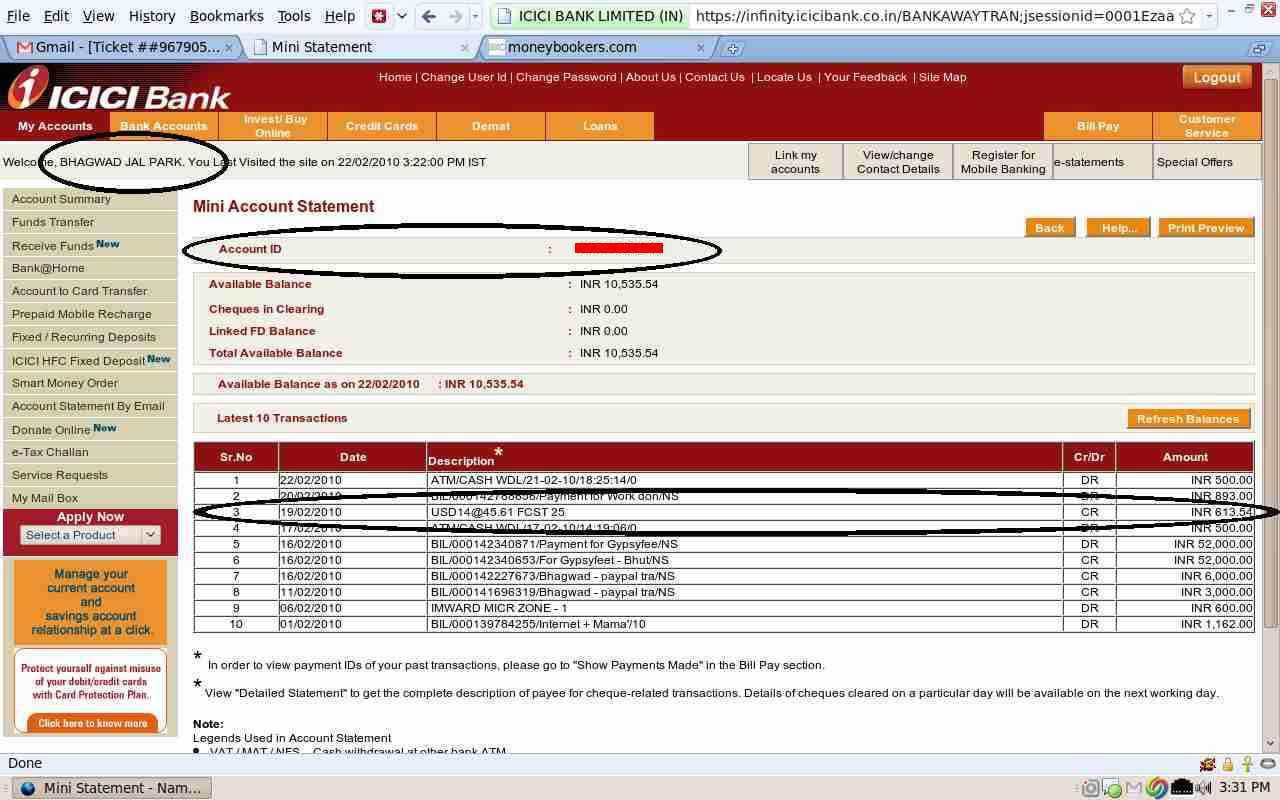
Unfortunately for me, all the needed details are visible except No. 5 – the name of the sender (Moneybookers). Their security team rejected the screenshot saying so, and asked me to send them the physical statement of the bank. I called ICICI and asked them if the physical bank statement would show Moneybookers as the sender, and they told me that they couldn’t see the details of the sender themselves!
I was stymied and once again called up Moneybookers and pleaded with them saying that my bank couldn’t provide me with a statement showing them as the sender. They got back to me saying that if that was the case,I must at least get a full print out of the SWIFT transaction from my bank, scan it and send it to them. So off I went to ICICI the next day to do just that and obtained this document:
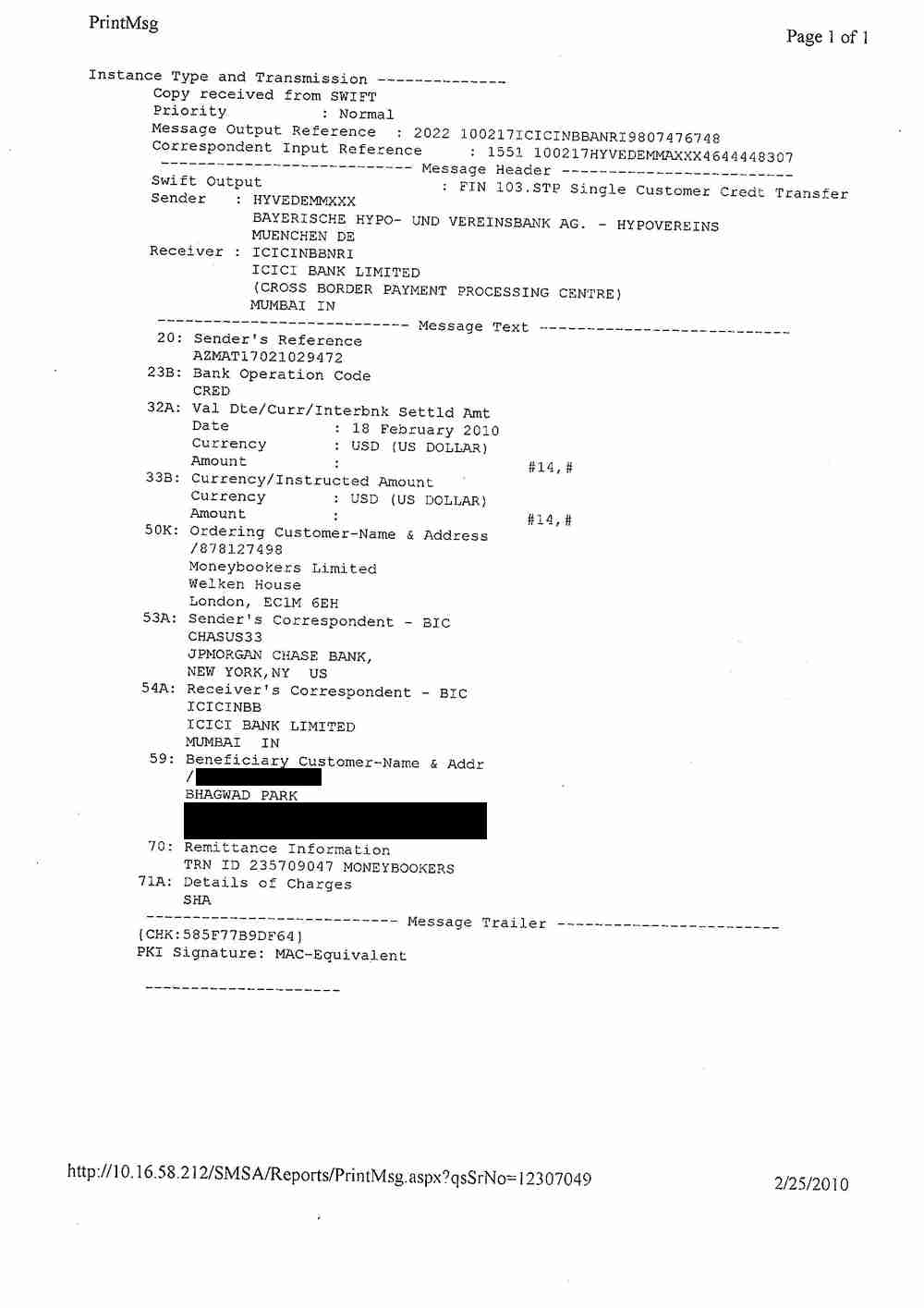
Praying to the (non existent) gods that they accept this as proof that I am indeed the owner of the Bank account in question, I sent it off to them and was rewarded two days later with an email from the security departing saying that my bank account has (at last!) been verified by their department. And my withdrawal limits were raised once more.
After my bank account verification, there was just one more thing for them to check up…
Commercial account vs Personal Account
I was reading some forums a week ago, when I came across the disturbing news that if I was using Moneybookers to receive payments for goods or services (which as a writer, I am), then I must have a commercial account and not a personal one. When you sign up for a Moneybookers account, you’re asked if you’re an individual or a company. Since I’m an individual, I got a personal account instead of a commercial one.
I went back and read the Moneybookers TOS and saw that if they suspect that I’m using a personal account to receive commercial payments, their security team will freeze the account and ban me. I was scared, and once again placed a call to them telling them that I’m a freelancer and that though I use my account for commercial purposes, I’m not a company but an individual. They got back to me with a mail saying that if that was the case, they would treat my account as a commercial one and that they wanted two further documents from me to prove my identity, namely:
- A scanned copy of a government issued document with an expiry date
- A utility bill that has actually arrived by post in the past 3 months
I was only too happy to send them a copy of the front and back of my passport, but I had a problem with the second requirement. Internet techie that I am, I pay every single bill of mine online and when I sent them my reliance Internet bill which arrived by email, the security team told me that it must be a scanned copy of a bill that was actually received by post in the last 3 months. Since I’ve just got back from outside India, I don”t have any such bill and had to wait for a while to obtain it.
They also sent over a “Merchant questionnaire” word document requesting details about my business and what I do etc etc. They told me to leave out the fields which are not applicable, and there were many like this since I’m not a company.
As matters stand, I’m still waiting for my Internet bill to arrive by post so that I can finish up this final verification stage. I finally got my Internet bill by post, scanned it (and scanned the envelope before opening it for good measure!), filled out the questionnaire with all details that were applicable to me and uploaded all three documents to the Moneybookers security team. I got back a reply in less than an hour thanking me for sending across the documents and informing me that all was well.
So that was the end of the verification procedures for me. I’m completely verified and all set to go! I’ve already withdrawn several thousand rupees into my ICICI bank account from Moneybookers and it’s been a better experience than Paypal due to the higher conversion rates.
I only wish there was some way to transfer money from my Paypal account to Moneybookers, since Paypal withdrawals into Indian bank accounts are more expensive and are fraught with complications thanks to the recent RBI ban. Moneybookers seems to be a professional company, and though their verification procedures can get a bit on one’s nerves, it’s that very scrutiny that inspires trust.
So here’s hoping that more Indian providers will ask their clients if they use Moneybookers for payments and if so, open an account with them.
can i withdrawl money to my bank account if it doesnot have swift code from monerbookers and if not how can i withdrawl?
In reply to Amit
You can’t. You need to get a SWIFT code to withdraw your funds.
In reply to bhagwad
so what should i do,i have an account in union bank of india,orissa
All "banks" have SWIFT code & NEFT code, its mandatory, however not all branches may be connected with swift network, in that case you use the main city branch or state branch of your bank's swift code, it will take more time than usual to get the money to your bank account but you will get it. Best is to ask the bank manager of your branch.
In reply to Ranjan
i also have account in Bank of india (uttam nagar) & my branch do nt hav SWIFT code.
i want to know can i use new delhi main’s branch’s that is NEW DELHI NRI Branch SWIFT code is
BKIDINBBDNI
In reply to Ranjan
2ND i also have account in STATE Bank of india (uttam nagar) & my branch do nt hav SWIFT code.
i want to know which one i have to use new delhi MAIN ’s branch’s SWIFT code or
NEW DELHI NRI Branch SWIFT code is
SBININBB153
In reply to Ranjan
2ND i also have account in state bank of india (uttam nagar) & my branch do nt hav SWIFT code.
i want to know which one use
new DELHI MAIN’s branch SWIFT code SBININBB104
or
delhi NRI branch SWIFT code SBININBB153
i have account in union bank of india,orissa.it has ifsc code but does not have SWIFT code .what should i do?
In reply to Amit
I really dont know…I would suggest you get a bank account bank which is a little more modern and supports SWIFT transactions.
How do you know your branch doesn't have a SWIFT code? I see lots of "Union Bank of India" SWIFT entries on Google – surely your branch must have one?
For example, if you're in Bhubaneshwar, the SWIFT code is UTBIINBBBBS. Go here for more SWIFT codes for the Union Bank of India: http://www.ratekhoj.com/swift-code/results.php?se…
In reply to bhagwad
i have account in state bank of india (uttam nagar) & my branch do nt hav SWIFT code.
i want to know which one i can use
new DELHI MAIN’s branch SWIFT code SBININBB104
or
delhi NRI branch SWIFT code SBININBB153i
please reply bhagwad please
@Ranjan well said.Yes we can make use our bank’s H.O’s SWIFT code .It worked for me though no delay found i got funds in 4 days on my bank account.
In reply to Jack
hey ranjan or anyone tell me wt is bank’s H.O’s swift ..means wt mean H.O here
In reply to Jack
and please reply i have account in state bank of india (uttam nagar) & my branch do nt hav SWIFT code. i want to know can i use new delhi main’s branch i mean state bank’s swift code?
In reply to Jack
i also have account in Bank of india (uttam nagar) & my branch do nt hav SWIFT code.
i want to know can i use new delhi main’s branch’s that is NEW DELHI NRI Branch SWIFT code is
BKIDINBBDNI
In reply to Jack
2nd i have account in bank of india (uttam nagar) & my branch do nt hav SWIFT code.
i want to know can i use new delhi main’s branch i mean state bank’s swift that is NEW DELHI NRI branch SWIFT code BKIDINBBDNI
want to transfer from moneybookers to paypal
thanks
Hi the information you have posted is very helpful but I am facing a few problems. I am expecting to periodically receive funds from the US for a religious charitable trust in India and was searching for a simple, cost effective way to receive it. I registered with moneybookers (currency code: USD) and gave them the Indian bank account. Now what would be the procedure to get the funds deposited into this account from the US. I tried to do a sample upload using a US bank account but that is not possible as moneybookers is located in Europe and you cannot do an online bank transfer from the US to a non US bank account. I tried using a US debit card to do a sample transaction but it did not go thru. I will be very grateful for any suggestions that would help straighten things out.
regards
What you went through, I am going through the same.
Today they have aksed me for my bank statement. Lets see how long does it take for me to verify everything.
My recent post Dead Space system requirement
Hello
Thanks for this detailed post.
I am having slight confusion with the MB withdrawal system. While signing up, I mentioned USD as preferred currency. Now I received a payment from a client and on 30th Sept, 2010 I placed withdrawal request. The INR was coming to 1600/- after MB deducted their fees.
I checked on 7th October and my account was credited with only 1231/- and not 1600/-. Do you have any idea why this happened? You have mentioned in your post that MB charges lesser fees than PayPal but if you see this situation, they charged me more than what PayPal charges.
I emailed MB and I received this reply:
“Dear Ms. Sinha,
Thank you for contacting us.
Please be kindly advised that withdrawals to your country of residence are considered as international and as such are being processed in USD or EUR on a sole discretion of the bank correspondent we use to process the funds. Moneybookers is a payer and not a processor in these occasions.
For transactions involving currency conversion Moneybookers adds 1.99% to our wholesale exchange rates for foreign currency. This charge serves as a protection against the volatility and risk associated with FX markets. The Moneybookers exchange rates are updated on a regular basis throughout the day.
Additionally, note that such transactions may be also subject to additional charges coming from intermediary parties involved in processing which are beyond our control.
As a result of the currency conversion in your occasion an amount of EUR 25.73 left our system.
Should you need any further assistance please do contact us again.
Sincerely,
Scarlett
The Moneybookers
### end###
Can you tell me what the above means?
Please help. I am not sure whether I should continue with MB or not.
Regards
Chitraparna Sinha
In reply to Chitraparna Sinha
Hi Chitraparna, can you tell me which bank you used to withdraw your money?
In reply to bhagwad
Hi Bhagwad, thanks for replying back. I have account in Syndicate Bank. Its verified with Moneybookers.
I went to the bank yesterday and they also said the same thing that MB sent 25.73 Euros only…
Tell me one thing – when a client deposits to your account, does it show in your account balance as USD or INR amount?
Chitraparna
In reply to Chitraparna Sinha
Since my MB account is in USD, I get my account balance in USD too. Are you sure you didn’t accidentally open your MB account in Euros? Which currency are you seeing your Moneybookers balance in?
I tried checking online by it looks like Syndicate Bank has a horrible website. Could you call the NRI department and ask them what the fees are for incoming International wire transfers?
It’s either the wire transfer fee or you accidentally opened your account in EUR…
In reply to bhagwad
Okay…I remember that I opened my account in USD but when I receive the pay, it automatically gets converted in INR and my account shows the converted balance… :( :(
When I withdrew, the account showed by withdrawal as 1600 INR, not USD or Euro!!! I don’t know what is happening!!
Maybe they are converting the INR into Euro at the time of processing and then when the Euro is getting transferred here, an additional fees is applied for the exchange from Euro to INR…Is that possible?
I message MB a while back asking for confirmation about the currency I opened my account with.
What do you suggest?
Chitraparna
In reply to Chitraparna Sinha
I think you did the right thing by calling MB. It looks as if you opened your account in INR – and you’re being hit with a double fee of INR – EUR – INR.
Let’s wait for Moneybooker’s reply and see what they say…
In reply to Chitraparna Sinha
Did you get any reply about the double conversion from MB, I wonder why they ask us to open a/c in INR when we actually receive money in USD or EUR.
Hey Bhagwad,
After reading your blog, I have joined money bookers to receive the payments from odesk. However, i am unable to find the swift code for the ICICI Indira nagar branch in Bangalore. Could you please help me with that?
Anjali
In reply to Anjali
Hi. As I’ve suggested in the post, you can use ICICINBBNRI as the SWIFT code for ICICI. But before you do that, call your branch, ask for the NRI department , ask for the SWIFT code for INR remissions and confirm that it’s the same one.
Hi Bhagwad
Nice to get so much info from here. I also have an account in ICICI. And can’t use PayPal due to PAN issues as I don’t have one.Presently I have gone for Moneybookers and applied for the address verification for the time being.
What do you think is more beneficial direct wire transfer from companies bank account to our bank account via swift to some intermediate bank or I should prefer it receiving via Moneybookers?
I will be receiving this payment in EUR and want it in INR in my bank account. What will be the charges in INR lets say I am receiving a transfer of about 100EUR. Do respond I am in a big trouble as my companies payouts have started.
In reply to Parichay
I think Moneybookers is best. But you really should get a PAN card for Income Tax purposes otherwise you’re liable to be caught and questioned. The recent trouble with PayPal was because of things like this.
You can get the exact updated fees on the Moneybookers site in either INR or EUR.