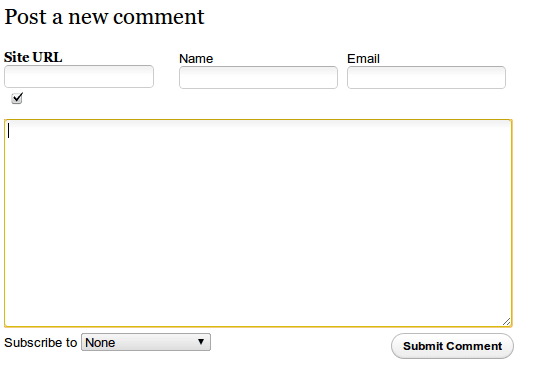
I prefer IntenseDebate to Disqus, but the default IntenseDebate layout leaves much to be desired. It’s very easy to change IntenseDebate using the “Custom CSS” option in the settings section. This is important because there are lots of things which need to be customized.
In this tutorial, we’ll see how to do these four things:
Remove the flashy and annoying “Login” buttons
Increase the height of the comment box
Enable and customize the “CommentLuv” plugin for IntenseDebate
Move the “Name” and “Email” fields above the comment box
These tips below should work for everyone. The documentation provided by IntenseDebate leaves much to be desired and I had to use Google Chrome’s “Inspect Element” command to figure out how to achieve the following.
Removing the Login Buttons
Most of our readers are simple people. They get confused by multiple login choices with different colors. Some of them don’t know that it’s optional and ask why they have to login (and sometimes create an account) and enter their Name, Email, URL! You can lose a lot of readers, cause the first rule of designing comment systems is Keep it simple!
Our first job is to hide all the annoying login buttons such as IntenseDebate, WordPress, Twitter, Facebook, and OpenID as well as the “Comment as a Guest, or Login” message. To do that, type the following into your “Custom CSS” section in the “Settings” tab:
.idc-postnav-label { display: none !important; }.idc-postnav-list { display: none !important; }
Save the CSS, reload your page and confirm that the buttons have vanished.
Increase the Height of the comment box
I never understood why the comment boxes are always so tiny. I like room to type my thoughts without having my last two lines scroll up and vanish. Unfortunately, the “Enable auto-expanding textareas” option doesn’t work. I sent an email to the IntenseDebate support group, but didn’t get any reply, which was a pity since it would be quite a killer feature if it worked. Anyway, increase the height of the comment box to 200px to give your commenters some breathing space:
#idc-container div.idc-text_noresize, #idc-container textarea.idc-text_noresize {height: 200px !important;}
Make sure you disable the “Enable auto-expanding textareas” checkbox.
IntenseDebate doesn’t always link names to your Website!
Some time ago, Automattic – the creators of WordPress – acquired IntenseDebate. Because of this, IntenseDebate got a new “feature.” Anyone who’s signed into their WordPress account is automatically signed into the IntenseDebate commenting system and so they see a “Posting as username” message when they comment on an IntenseDebate enabled site. This sounds great, but the big gaping hole is that after posting the comment, the name of the person links to their IntenseDebate profile instead of their website!
Most people don’t have an IntenseDebate account, but lots of people have a WordPress account. When I comment on someone’s post, I want my name to link back to my website. As of now, if a WordPress logged-in user comments on your IntenseDebate enabled site, their name will link to a blank IntenseDebate profile, leaving other readers no way of knowing who they are, or what their website is. Here’s what it looks like:
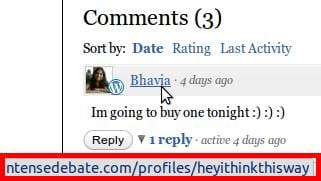
See the link in the red box? That’s what the name of a commentor links to. And most people’s default IntenseDebate profile is blank. The only way for a WordPress Logged in commenter to get their name linked to their own URL is to log out first, then fill in the Name, Email, and URL fields.
No one is going to take that much effort.
There’s no workaround for this. As of now, there’s only one thing I’ve been able to do that somewhat mitigates the effect of this terrible design decision – and that is to activate the “CommentLuv” plugin.
Enable and customize the “CommentLuv” plugin
If you’re using IntenseDebate, you simply have to use the CommentLuv plugin for the reasons given above. What this plugin does, is that it allows commenters to fill out a “URL” field. It then grabs the latest post from the feed of that URL and appends it to the comment. So people who want to find out more about a commenter can click that link to go to their website.
To enable the CommentLuv plugin just go the “plugins” section in your IntenseDebate account and activate it. This will place a small “Site URL” box underneath the comment box. But once again, there’s a big flaw.
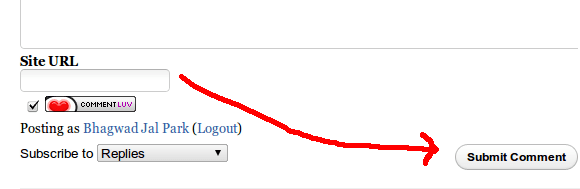
For the CommentLuv plugin to work, a user has to type their URL into the box. But after that, they have to click somewhere else for the plugin to retrieve the latest post. By default, the CommentLuv box is below the main comment form and so most users just click “Reply” after typing in their URL. This means that the plugin won’t have the time to go get the latest post and thus won’t work.
The solution is to use CSS to place the CommentLuv section above the comment entry box. This way, users will first fill in their URL and then type in their comments giving the plugin plenty of time to find the latest post and prepare it for insertion. Here’s the CSS to do that:
#IDCommentsNewThread {position: relative !important;padding-top: 80px !important;}
#IDCommentReplyForm1{position: relative !important;padding-top: 80px !important;}#luv_field_new {left: 0px !important;position: absolute !important;top: 10px !important;}
#luv_field_reply {position: absolute !important;top: 10px !important;left: 0 !important;}
This pads the top of the comment box and the “Reply” box with 80 pixels and positions the CommentLuv primary and reply sections on the top left.
Move the “Name” and “Email” fields above the comment box
Of course, now that the “Site URL” field is above the comment box, we should move the “Name”, “Email” and “URL” fields to to the top as well next to it. Here’s the CSS to achieve just that:
#IDCommentReplyDiv{position: relative !important} /*Prepare reply comment for positioning */
#IDCommentReplyForm2{position: absolute !important; top: 31px !important; left: 200px !important;}
#IDCommentNewThreadForm2 {position: absolute !important; top: 7px !important; left: 175px !important;width: 100% !important;}
These have to work in conjunction with the CSS commands in the previous section.
Hide the “CommentLuv” image and the “IntenseDebate” logo
If you really want to clean up the comment section, this CSS will hide the unnecessary images:
.idc-foot { display: none !important; }
span#mylastpost img:first-of-type { display: none !important; }
Putting it all together
Here is my consolidated CSS put together for easy copy paste:
.idc-postnav-label { display: none !important; }
.idc-postnav-list { display: none !important; }
.idc-foot { display: none !important; }
#idc-container div.idc-text_noresize, #idc-container textarea.idc-text_noresize {height: 200px !important;}/*Pad and prepare new comment and reply comment boxes */#IDCommentsNewThread {position: relative !important;padding-top: 80px !important;}
#IDCommentReplyForm1{position: relative !important;padding-top: 80px !important;}#IDCommentReplyDiv{position: relative !important} /*Prepare reply comment for positioning */
#IDCommentReplyForm2{position: absolute !important; top: 31px !important; left: 200px !important;}
#IDCommentNewThreadForm2 {position: absolute !important; top: 7px !important; left: 175px !important;width: 100% !important;}#luv_field_new {position: absolute !important;top: 10px !important;left: 0 !important;}
#luv_field_reply {position: absolute !important;top: 10px !important;left: 0 !important;}#all_luv{font-weight:bold !important;} /*Bold the text for comment luv */
span#mylastpost img:first-of-type { display: none !important; }
After making all these changes, here’s what the final result looks like for a non-logged in user:
It’s close enough to the default WordPress comment system for me. Hope this little tutorial helps you out!
may i know how to configure intense debate to move the comment box to top of the content section?
In reply to ika
The support guys have suggested this workaround to achieve it. Let me know if it works for you.
In reply to bhagwad
Hi bhagwad,
It’s not working properly for me. That codes broke the view of comment box.
Wowww Thanks!!!
Me ajudou muito!!
Agora tenho um formulário simples e super funcional :)
Meus leitores não são acostumados com tantas opções no formulário e com sua dica ficou mais fácil para eles comentarem no meu blog!
bj
In reply to Gizaa Veiga
Fico feliz que eu poderia ajudar Gizaa:) dei uma olhada em seu blog e do formulário de comentários parece arrumado e limpo da maneira que deveria!
PS: Estou usando o Google Translate para este tipo de mensagens em Português – espero que isso faz sentido
Thanks for responding and for visiting my blog!
In fact the form was great! Thanks again for the tip!
(I’m also using the google translate lol)
Hugs
Has anyone else found intensedebate doesn’t work correctly on Google Chrome?
No problems on all the other major browsers on a PC, FireFox, IE8, Safari, and Opera all work fine – so what does Google Chrome do to screw things up?
In reply to Dee
I use Google Chrome, and it works just fine. What do you mean by “doesn’t work?” Are you unable to post a comment, or you can’t display the form itself?
Maybe people can check on here, but I don’t even see a comment box on my Google Chrome Version 7.0.536.2 .. all the other browser work just fine.
Before the custom CSS there was a comment box but when you typed anything into any of the boxes it might take a minute before whatever you typed even appeared.
http://www.everytwoweeks.com/november-meetup-london/
In reply to Dee
I just tested it out. It seems the problem occurs only when I’m logged out. That’s strange. I didn’t have that problem when I was using it.
I see you haven’t enabled commentluv – my custom CSS has commentluv code in it, so enable that and see if it works then. Also, the login buttons appear though my code hides them. Did you make changes to that too?
What happens when you remove all custom CSS? Same issue?
Yes I wanted the buttons to appear – well at least Facebook and Twitter as I think it’s nice when people’s photos appear next to their comment – so I removed the 2 lines of code so that the buttons would come back.
If there was just a way to get remove the intensedebate and wordpress button it would be cool.
I also enabled the CommentsLuv option but not really sure what difference it makes.
In reply to Dee
Hmm – was just checking whether the problem was CSS based. Looks like it’s not. Did you try removing all the custom CSS to see if it works?
Also, what platform are you using? WordPress?
I’m using a PC with Windows 7
Had problems with IntenseDebate before adding the custom CSS – like I said it would have a huge delay between typing in the Name or Comments Boxes
I’ve seen others refer to problems with Chrome and IntenseDebate
http://www.google.com/support/forum/p/Chrome/thread?tid=383aee0782b7ecb7&hl=en
In reply to Dee
I mean what application is your website on? WordPress? Joomla? This way we can narrow down the problem since there are different plugins for different applications?
For WordPress I can confirm that it works fine. So looks like other platforms need some work, or maybe it’s a Chrome issue.
In reply to bhagwad
if you want to remove the email field, paste this in the custom CSS:
#txtEmailNewThread{position: absolute !important; top: 62px !important; left: 0px !important;}
#IDCColumnEmailLabel{position: absolute !important; top: 62px !important; left: 0px !important;}
Then, go to the settings and tell intensedebate to hide the descriptions for the fields. People aught to know how to fill in the “name” field.
if you have any problems with this, remove any css code you had before, leaving only the two lines above. It works beautifully on my site, and so long as you have emails as not required, your users won’t have any further problems. :)
I am using WordPress 3.0.1 – might try booting into Ubuntu 10.10 to test
In reply to Dee
Hmm – so you’re on WordPress. No idea what could be wrong since it’s working fine with other WordPress installations. I can give the usual advice to try disabling all other plugins etc, but you may have already tried that…
I just boot into Ubuntu to test as my machine is dual boot – Ubuntu 10.10 running Google Chrome 6 and it worked perfectly on that – might be a Google Chrome version 7 issue
I noticed on Chrome 7 the page loads fine with all the boxes intact and then seems to reload by itself with the comments box disappearing.
Thanks for writing this post. You told me about this at http://davidknapp.mosaicmercy.com/is-intense-debate-worth-it/
I didn’t use it there because I quit using ID. But I am using it at the site linked to my name.
Thanks so much for providing the CSS :-)
In reply to David Knapp
Ah! Looks sexy. I’m quite impressed by how everyone’s name is linking to their website instead of their IntenseDebate profiles. How did you manage that? Do all of them have ID profiles? And I noticed that their ID profile doesn’t popup when I hover over their pics either…