I prefer IntenseDebate to Disqus, but the default IntenseDebate layout leaves much to be desired. It’s very easy to change IntenseDebate using the “Custom CSS” option in the settings section. This is important because there are lots of things which need to be customized.
In this tutorial, we’ll see how to do these four things:
Remove the flashy and annoying “Login” buttons
Increase the height of the comment box
Enable and customize the “CommentLuv” plugin for IntenseDebate
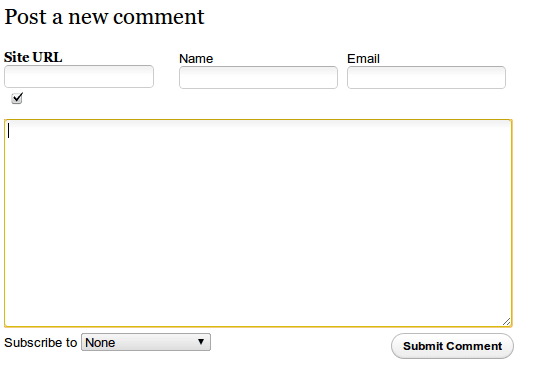
Move the “Name” and “Email” fields above the comment box
These tips below should work for everyone. The documentation provided by IntenseDebate leaves much to be desired and I had to use Google Chrome’s “Inspect Element” command to figure out how to achieve the following.
Removing the Login Buttons
Most of our readers are simple people. They get confused by multiple login choices with different colors. Some of them don’t know that it’s optional and ask why they have to login (and sometimes create an account) and enter their Name, Email, URL! You can lose a lot of readers, cause the first rule of designing comment systems is Keep it simple!
Our first job is to hide all the annoying login buttons such as IntenseDebate, WordPress, Twitter, Facebook, and OpenID as well as the “Comment as a Guest, or Login” message. To do that, type the following into your “Custom CSS” section in the “Settings” tab:
.idc-postnav-label { display: none !important; }.idc-postnav-list { display: none !important; }
Save the CSS, reload your page and confirm that the buttons have vanished.
Increase the Height of the comment box
I never understood why the comment boxes are always so tiny. I like room to type my thoughts without having my last two lines scroll up and vanish. Unfortunately, the “Enable auto-expanding textareas” option doesn’t work. I sent an email to the IntenseDebate support group, but didn’t get any reply, which was a pity since it would be quite a killer feature if it worked. Anyway, increase the height of the comment box to 200px to give your commenters some breathing space:
#idc-container div.idc-text_noresize, #idc-container textarea.idc-text_noresize {height: 200px !important;}
Make sure you disable the “Enable auto-expanding textareas” checkbox.
IntenseDebate doesn’t always link names to your Website!
Some time ago, Automattic – the creators of WordPress – acquired IntenseDebate. Because of this, IntenseDebate got a new “feature.” Anyone who’s signed into their WordPress account is automatically signed into the IntenseDebate commenting system and so they see a “Posting as username” message when they comment on an IntenseDebate enabled site. This sounds great, but the big gaping hole is that after posting the comment, the name of the person links to their IntenseDebate profile instead of their website!
Most people don’t have an IntenseDebate account, but lots of people have a WordPress account. When I comment on someone’s post, I want my name to link back to my website. As of now, if a WordPress logged-in user comments on your IntenseDebate enabled site, their name will link to a blank IntenseDebate profile, leaving other readers no way of knowing who they are, or what their website is. Here’s what it looks like:
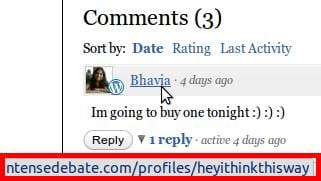
See the link in the red box? That’s what the name of a commentor links to. And most people’s default IntenseDebate profile is blank. The only way for a WordPress Logged in commenter to get their name linked to their own URL is to log out first, then fill in the Name, Email, and URL fields.
No one is going to take that much effort.
There’s no workaround for this. As of now, there’s only one thing I’ve been able to do that somewhat mitigates the effect of this terrible design decision – and that is to activate the “CommentLuv” plugin.
Enable and customize the “CommentLuv” plugin
If you’re using IntenseDebate, you simply have to use the CommentLuv plugin for the reasons given above. What this plugin does, is that it allows commenters to fill out a “URL” field. It then grabs the latest post from the feed of that URL and appends it to the comment. So people who want to find out more about a commenter can click that link to go to their website.
To enable the CommentLuv plugin just go the “plugins” section in your IntenseDebate account and activate it. This will place a small “Site URL” box underneath the comment box. But once again, there’s a big flaw.
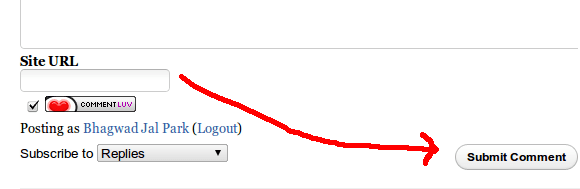
For the CommentLuv plugin to work, a user has to type their URL into the box. But after that, they have to click somewhere else for the plugin to retrieve the latest post. By default, the CommentLuv box is below the main comment form and so most users just click “Reply” after typing in their URL. This means that the plugin won’t have the time to go get the latest post and thus won’t work.
The solution is to use CSS to place the CommentLuv section above the comment entry box. This way, users will first fill in their URL and then type in their comments giving the plugin plenty of time to find the latest post and prepare it for insertion. Here’s the CSS to do that:
#IDCommentsNewThread {position: relative !important;padding-top: 80px !important;}
#IDCommentReplyForm1{position: relative !important;padding-top: 80px !important;}#luv_field_new {left: 0px !important;position: absolute !important;top: 10px !important;}
#luv_field_reply {position: absolute !important;top: 10px !important;left: 0 !important;}
This pads the top of the comment box and the “Reply” box with 80 pixels and positions the CommentLuv primary and reply sections on the top left.
Move the “Name” and “Email” fields above the comment box
Of course, now that the “Site URL” field is above the comment box, we should move the “Name”, “Email” and “URL” fields to to the top as well next to it. Here’s the CSS to achieve just that:
#IDCommentReplyDiv{position: relative !important} /*Prepare reply comment for positioning */
#IDCommentReplyForm2{position: absolute !important; top: 31px !important; left: 200px !important;}
#IDCommentNewThreadForm2 {position: absolute !important; top: 7px !important; left: 175px !important;width: 100% !important;}
These have to work in conjunction with the CSS commands in the previous section.
Hide the “CommentLuv” image and the “IntenseDebate” logo
If you really want to clean up the comment section, this CSS will hide the unnecessary images:
.idc-foot { display: none !important; }
span#mylastpost img:first-of-type { display: none !important; }
Putting it all together
Here is my consolidated CSS put together for easy copy paste:
.idc-postnav-label { display: none !important; }
.idc-postnav-list { display: none !important; }
.idc-foot { display: none !important; }
#idc-container div.idc-text_noresize, #idc-container textarea.idc-text_noresize {height: 200px !important;}/*Pad and prepare new comment and reply comment boxes */#IDCommentsNewThread {position: relative !important;padding-top: 80px !important;}
#IDCommentReplyForm1{position: relative !important;padding-top: 80px !important;}#IDCommentReplyDiv{position: relative !important} /*Prepare reply comment for positioning */
#IDCommentReplyForm2{position: absolute !important; top: 31px !important; left: 200px !important;}
#IDCommentNewThreadForm2 {position: absolute !important; top: 7px !important; left: 175px !important;width: 100% !important;}#luv_field_new {position: absolute !important;top: 10px !important;left: 0 !important;}
#luv_field_reply {position: absolute !important;top: 10px !important;left: 0 !important;}#all_luv{font-weight:bold !important;} /*Bold the text for comment luv */
span#mylastpost img:first-of-type { display: none !important; }
After making all these changes, here’s what the final result looks like for a non-logged in user:
It’s close enough to the default WordPress comment system for me. Hope this little tutorial helps you out!
Love it thank you! Is there any way of changing the recent comment widget? The fonts are tiny and difficult to read, also I would love to have a scrolling recent comments widget. Is that possible with intensedebate?
In reply to Unmothered Child
I tried, but we can’t change the recent comment widget :( . It’s javascript and I don’t think it’s possible.
How do you get rid of just the intensedebate login button? I want to leave FB, Twitter, etc. I’ve heard it can’t be deleted due to javascript issues. Seeing this thread, it’s obviously not true.
So, can you help me out? No one else can..lol How do you get rid of 1 login button, the intensedebate login?
Hi,
Thank you for sharing this css code with us all; I spent hours looking for it. However, when the reply button is clicked, the comment luv site url form gets jumbled up with the name form. Is this fixable?
Thanks.
Hello,
Thanks for sharing, just finished adding it to my custom css bundle,
its very nice and its a clean layout, I’m happy I’ve stumbled across-ed this post in Google!
Keep Flowing Good Post! [in other words] (Keep Up The Good Work!)
-TheEmoLab (;
i have firefox and the firebug plugin, so it made styling intensedebate simpler for me, but then again, i’m self taught, and it has taken me 2 days to do just what i’ve done so far (check it out at http://ask-lana.blogspot.com). anywho…
in order for me to style the submit button, i had to convert buttons into text links (which is how i managed to achieve that fancy red submit button at the bottom of the form *patting self on back*). in doing so, i can’t customize the “reply” link without it affecting my submit button! =-O
i tried everything i could think of to remove the reply link (i tried disabling threads, i tried css, etc.), but no matter what i do, when i try to remove the reply link, it messes with my submit comment button, and that’s just unfortunate! >:-/
would you happen to know how to remove the reply link altogether? (without it affecting the submit comment button, that is.)
also…
with all the various web browsers out there (what a flippin’ headache!), i’ve run into a bit of a problem positioning my big red submit comment button, as well. i want to float it to the left, instead of the right. let me tell you, float:left does NOT do it! i can achieve what i want with position:relative; margin-left:-585px; but then it only works in firefox, and messes wayyyyy up in both safari and ie8. i tried floating the bottom portion of the form via float:left; and then adding padding to the bottom but that only worked in ie8 and not in firefox (i’m too scared to look in safari!).
any suggestions? 1) remove reply link, and 2) position submit comment button to the left of the form.
help! thank you in advance. :-D
p.s. it was murder trying to remove the focus (the yellow border/outline that appears when you click within the text fields, but i got it to work, and figured i’d share (only took me 2 days to figger it out!) — if you want something to work that SHOULD work in your personal style sheet but doesn’t, then you can try pasting it into the custom style sheet area directly in your intensedebate account page. one thing controls another, so things should work if they’re working together. if you only have parts of the css on YOUR site, things might not work the way you want them to. so it’s a good idea to host the intensedebate css directly at intensedebate. hope this makes sense.
so anyway…
help! (please.)
thanks! :-)
In reply to Lana
Great job with the comment for on your site Lana – it really does look great! Like you, I’m self taught but I’ve been out of touch with this for a while and one just forgets everything….
Still, I dug around and perhaps this will work in your CSS for hiding the reply button:
.idc-btn_s { display: none !important; }
About the alignment thing, I’m not sure…sorry :(
Hope this helps.
thanks for getting back to me so quickly.
and yes, i tried .idc-btn_s { display: none !important; } to no avail, sadly :-(
i tried every single id and class i could think of surrounding the reply link, and the problem is, intensedebate uses “universal” buttons–meaning, the same css for both the reply AND the submit comment buttons (links, in MY case).
so…
that means…
when you style one of them, it ends up affecting the other one, too.
i suppose i can live with it for the time being *sigh*.
thanks again for a quick reply! :-)
Sick! I was just looking for this. Great Post.
Thank you :)
thank you at first. 3 days ago i installed intensedebate and i used the code from here.
can anyone tell me if there is a code to saw up auto avatar icons for my commenters?
Thank you for the nice tuturial. I am adding the CSS to the custom CSS page in settings, because using an external CSS does not seem to work, and adding the CSS to my theme is totally ignored as well.
But Firebug is not catching the CSS as coming from the website, dont know why. It displays all ID CSS as if it is under the “body” css.
I wish there is a way around this, because customizing the CSS is very difficult.
What i want to do is to place the login buttons, all of them, above the commenting box and not under it. How can I do this?
I tried:
position: absolute !important; top: 31px !important;
But this moved it to top of the blog, not top of the ID box.